I direct bridge games and tournaments and create stuff for my bridge work which people seem to want. So I set up this web page to slowly put the things (essays, programs, information) I’ve created into the public domain. If I were a better writer or programmer I would not be giving them away, but since I am not, I trust you will not descend upon me in anger should they not interest you or work for you...
Among the other things you may currently — or eventually — find here (pick a tab):
TLDR: The McBruce Reader
Original Writing New and Old
Three different sources for material on this page: old facebook postings (blue background), old bridge articles (green), new stuff (gold). They're all on this page and most have been featured at the bottom of the mcbruce.ca main page. You can scroll through and read them all if you have several hours, or pick and choose from this contents table, for which there is a link back here separating each piece from the next:
Many of these, especially the old bridge articles from the Matchpointer, were originally printed in a format that makes me cringe today: semi-condensed fonts at small sizes, carefully chosen to maximize the amount of reading material I could get onto a certain number of pages, to encourage people to take the free magazine home with them, rather than read it at the club and leave it there, so that a few weeks later, when they needed some bit of key info it would already be in their homes. The internet has changed all this, of course, we can recast the text with a decent-sized and spaced typeface, and need not worry about the space it takes, since everyone can easily scroll down when their screen space runs out.
This also gives me a chance to make minor touch-ups, small corrections, or occasionally write an introduction explaining interesting facets of an article. I'll try to limit this to the smallest of edits rather than a complete re-write to conform to current standards. One nice advantage for the bridge articles is that we can use better looking suit symbols that the monochrome ones I used on paper.
Remember that you have options for reading as well: on a computer you can use CTRL and (plus) to increase the size of the text, CTRL + (minus) to decrease it, and CTRL + (equals) to return it to the original size. The text will reset itself to the screen space you have, based on the size you choose. On a touchscreen device, there are options for doing this as well, but pinching and two-finger unpinching doesn't work; that simply magnifies the text off the right edge. Check your device for options.
Happy reading!
Contents (more appearing as I find them) Newly written Old Facebook Stuff Bridge Writings
- The Centenary Jolt Duplicate Bridge Needs! — (2025 Whistler Regional Daily Bulletin, Sunday page) — A few new rules to spice up a game entering its second century.
- The New Holiday — (July 1, 2021 and September 30, 2021) — Some thoughts on Orange Shirt Day.
- B’Bye — A Small Appreciation — (July 27, 2025) — Farewell to the flugelhorn player in the fedora.
- Stanislav Petrov (1939-2017) — (Sept. 26, 2012) — We may be alive today because of what he didn’t do on September 26, 1983.
- ACBL Scorecard/Convention Card Holders — (Sept. 7, 2012) — Originally posted in the BBO forums when someone from Europe asked why we combine the two...
- Three Stages of Baseball History — (March 22, 2012) — Actually lifted from an article by Bill James.
- Is There Any Hope At All? — (May 6, 2025) — McBruce On The Current Wave Of Dumb
- An Olympics Thought — (August 8, 2016) — A very strange four-lap race...
- Just Watch Me — (November 2000 Matchpointer) — A clever re-write of the Pierre Trudeau classic quote to make a point.
- Deregulators Beware! — (September 10, 2012) — Getting rid of regulations without understanding them is asking for trouble.
- Waiting Here In Allentown — (August 9, 2014) — Do you remember what they were waiting for? I didn’t....
- A New Version — (August 5, 2025) — As we wait to see if the Whitecaps are actually going to sign a German star....
- Exhibits in Bafflegab — (September 10, 2014) — Referendum questions that are incomprehensible do not fare as well as simple, clear ones.
- Hurry Up And Think — (October 1995 Matchpointer) — An early McBruce article that has travelled the globe!
- Eight Days of Movies — (January 8-16, 2015) — McBruce sees most of the eight 2014 Best Picture nominees in just over a week
- HHIT Goes For The Million — (August 2000, November 2000, December 2000, and March 2001 Matchpointer) — The Hideous-Hog-In-Training visits an NABC where they have staged a bridge version of the popular game show.
- That Aria That We All Recognize But Almost Nobody Actually Knows Or Cares What Opera It Comes From — (June 11, 2021) — You've heard it, the famous piece that tenors sing, often before sporting events, with the big high note at the end. Here's what it is: strap yourself in....
- Dream Interpretation — (January 14, 2026) — McBruce wakes up and attempts Freudian analysis.
From The Archives
I've stopped posting to Facebook but have kept a big file of stuff I posted there over about a decade (link), and I'll post some of the best ones here from time to time, as well as on a new site here, along with some of the things I've written for other publications. The following two reactions to FIFA World Cup 2026, however, are original and recently composed....and see the note at the end.
New Bestseller: Catch-27 (special FIFA 2026 version)
(posted on several Reddit streams on June 7, 2026, during the World Cup)
(The events which set this up, in case you've forgotten: In the round of 32 match between USA and Bosnia-Herzgovina, the top-scoring American forward was given a red card after a VAR review which most thought was harsh. I thought it reasonable and the arguments against it did not seem consistent with the Laws of The Game, which even TV experts and former referees ignored. USA won the match and advanced to play Belgium in the next round, with their best forward ineligible. But then FIFA president Gianni Infantino invoked FIFA's Rule 27 for the first time since 1962, allowing an anonymous committee to review disciplinary sanctions. Suddenly the US player was cleared to play, and it didn't take long to suspect and then confirm that a phone call from the president was how the secret committee got off its ass for the first time in 64 years. No explanation for their decision was given, nor were the names of the committee members revealed. Belgium's football association protested and was ignored, and the match was won 4-1 by Belgium, steering away from a potential controversy of record proportions. I borrowed many well-known passages of Heller's masterpiece to create this satirical account, using USArrian for Yossarian, Johnny Littlebaby for Gianni Infantino, Luigi No-Eyebrows for FIFA director of officiating Pierluigi Collina, and Doc De Bruyne for Doc Daneeka, a play on Belgian aging star Kevin De Bruyne, who was rested for the next round.)
The first time USArrian saw the president he fell madly in love with him.
There was only one catch and that was Catch-27, which specified that a player who didn’t play by the rules had to be sent off and suspended for one more game. Actually, that was spelled out in the rest of the rules that nobody read. Catch-27 said that a mysterious, anonymous, possibly even imaginary committee watched over everything that happened and maybe once a half-century would send word that a sending off should itself be suspended, meaning the suspended player wasn’t suspended for the next game but might be suspended later if he made the invisible committee’s lenience look bad. USArrian, who had been sent off and suspended and was now under suspended suspension and therefore eligible to play, was deeply moved by the simplicity of this clause of Catch-27 and let out a respectful whistle.
“That’s some catch, that Catch-27,” he observed.
“It’s the best there is," Doc De Bruyne agreed. "The whole Belgian contingent tried to knock it down with questions about its decisions: who, why, how, when, and got nothing at all in response.”
Colonel Johnny Littlebaby put the phone down and read the transcript of the conversation again. The president wanted something done. The president was a great sports expert and had been a great athlete in his day, and these red cards, and the suspension they carried with them, were a mystery to him. “A total surprise, and it takes out our best player.” Littlebaby was relieved he had not pointed out that this player, USArrian, would struggle to make the second eleven of Belgium. He wrote “USArrian!!?” on his memorandum pad, amplifying it sharply with a series of coded punctuation marks and underlining the whole message twice. Then the solution hit him and he looked up the number of Luigi No-Eyebrows.
“Johnny, you have an out, you know,” said No-Eyebrows when told of the president’s demands. “Catch-27 will work perfectly for this.”
“But I’ll be criticized in the press for caving to a dictator. And how do I find a committee that will do what I want?”
“Johnny, relax: you’ve been criticized in the press for the last eight months, what’s the difference what the specific issue is? It’s your job, you get to fly around everywhere but you have to take the heat and smile. As for the committee, it’s anonymous and secret and explains nothing, so there is no need to actually appoint anyone to it. Just announce the decision.”
In the Belgian dressing room before the game, the players talked quietly among themselves while getting into their match kits. The coach entered the room, got their attention and said very seriously, “I don’t want the extra stuff in the press surrounding this game to affect how we play today.”
There was complete silence. The left back said “what extra stuff?" Five or seven more said “yeah, what?”
“Their top scorer got a red card in the last match and was unavailable today, until Catch-27 came out of retirement after 64 years and suspended the suspension during the tournament. So .... he’s playing.”
More silence. Now it was the sardonic right winger. “I thought we were playing America today. Is that still true or did Catch-27 change that as well? Are we suddenly up against France or Argentina somehow?”
The assistant was about to hit him with a cruel zinger, but the manager saw the confidence in the players and motioned to the assistant to leave it. The assistant missed the signal and yelled at the right winger about the perils of underestimating an opponent. “Suppose everyone felt that way!” was his parting shot.
The winger rose, stared down the assistant, and kicked a ball in his direction after he broke first and walked away. The ball missed his backside by a few inches but bounced off a support post right into his nuts. Down he went. “Then I'd be a damn fool to feel any other way, wouldn't I,” said the right winger, who turned and faced the hallway to the stadium and took off.
FIFA Family Values
(posted on Reddit on July 21, 2026, two days after the World Cup Final)
June 11, 2026
My Darling Wife And Children:
The World Cup begins tomorrow and I have taken six weeks off to stay home and watch the football on TV. A schedule of matches has been posted outside the upstairs TV room along with kickoff times; for those periods plus initially an hour before and an hour afterward (this extra time before and after will increase in the later stages) for the pre- and post-game shows, I am reserving the room and the TV remote for the duration of these periods. Another TV has been setup downstairs with all of our channels on it, so you can keep up with professional wrestling and other piffle. You are welcome to come and watch the football with me but I cannot and will not deal with endless interruptions for silly questions or because it has in your view become boring. There are several hours in each day where there is no football on and I ask that you reschedule family meals and leave general chores that only I can perform for those hours while you catch up on what you missed in the strange world of professional wrestling that for some arcane reason you cannot get enough of.
Thanks in advance,
Father
July 20, 2026
Dear Dad:
Now that it’s all over, we need to see if we can get Mom back. Have you noticed her absence at all? We all accept that after over a month of viewing matches at weird hours and sleeping at even weirder times in order to be awake during the games, you may be overtired and a bit dizzy. But she did leave just before the quarterfinals began. We’re not sure where she is but she left this note, with instructions that we show it to you only after the Final:
Darling,
Four weeks ago you notified us that you were going to watch the football for the next six weeks, and established ground rules and schedules and reserved the main TV room. Since I and the kids follow pro wrestling, it was good of you to set up the second TV downstairs so we could continue to do so, and good of you to let us know when we could eat together so I could prepare meals that would counter the chips and beer you were consuming at such alarming rates and keep you from turning into a beer-soaked rancid potato.
I must tell you that as the tournament has progressed, your dinnertime summaries of what we all were ‘missing’ got considerably more unhinged, and I have a simple question for you to consider. Let the kids know when you have a decent answer and they will relay it to me and perhaps I can return. You’ve consistently stated that the teams you support (and hopefully have not bet too much of our money on) have been systematically shafted by the referees, by the video assistants, and then later by FIFA itself and FIFA’s president, and even by President Trump somehow. While for the teams you don’t like, the opposite is consistently true: referees look the other way and let them win, with the video guys’ help; and FIFA nods and winks knowingly, as though to let us know that they realize exactly what’s going on. Here then is my question:
How, exactly, is this so different from the professional wrestling you hate so much?
As stated above, both of these were written without AI assistance and posted to Reddit, and in both cases were removed from Reddit after commenters claimed that it was AI-slop and the moderators agreed. The capper was on r/MLS, where the moderators promoted a ‘free talk Thursday’ where they would allow almost anything, and a suggestion I made about penalty shootouts (hold them before, not after, extra time, and the shootout result is what decides the winner if still tied after two more 15-minute halves) that took maybe two minutes to read was removed because it was “clearly AI.” It wasn't: I composed it at the keyboard in about fifteen minutes. I think we’ve reached the point now where anything more than 100 words long is too much for Net-heads and ‘AI-slop’ is the new ‘TL/DR.’ Or maybe the disappearance of print media has affected my writing style, which has always been a bit wordy. I‘d prefer moderators hit the people who cannot spell the word ‘lose’ (anytime I see ‘loose’ I know what’s coming is not going to make a lot of sense...) rather than hit posts and comments that have good spelling and grammar because that means AI was clearly involved.
Unit 430 Stuff
Unit 430's Web Site, with information on tournaments and events, is here
Unit 430 Masterpoint Races — 2026-current — 2025-final — 2024-final — 2023-final — 2022-final (see note below) - 2021-final (see note below) - 2020-final - 2019-final - 2018-final - 2017-final using a new (OK, it's no longer so new, I wrote it in 2017) program that combines a long text file of results with an even longer text file of player data.
Starting in 2024, Unit 430 began rotating Unit Games among several clubs so that everyone in the Unit can more easily play one, and the news about where the next one is should be at the Unit 430 site (link). Club directors running the games are sending files to me for processing: the game results on ACBL Live are here, the updated list of free plays given out to Board Members for their service and masterpoint winners is here, and instructions for Unit Game directors are here.
NEW: recent Bridge Results, including local sectionals and Unit Games, now posted on this site: click on the words Bridge Results above to check it out!
Mentor-Mentee Hand Analyses by McBruce: special web pages where the 22 boards in the Mentor-Mentee Games are played and commented on by McBruce, who usually gets trashed by the computer players he plays them against, making it fun reading for all! I returned and ran the one on November 29 at the Vancouver Bridge Centre: deal comments are here.
- Older deal sets with comments:
Bridge Utilities
I sometimes write programs to help bridge directors which may be of interest. I am by no means any damn good at this, if fact my tendency is to abandon a program once it works for me rather than fix the remaining niggling bugs, so use these at your own risk. Select from the following:
I finally got the time to move from Phase 1 (read as much as you can about JavaScript from as many sources as possible and try to get your head around at least the basics) to Phase 2 (actually write some [censored]ing code) and my first project is Gametime3, an improved version of the bridge round timer I wrote in the 90s in QBASIC and then in the 2000s in PerlTk. You can try it out here, and view some screenshots and read about it here. Next project is a new version of "sdaphr" - the program that allows you to enter shuffled hands and get a PBN (Portable Bridge Notation) file. I've been using it but it's not really ready for general release: entering cards on a numeric keypad seems to interfere with many common browser shortcuts and changes to your browser setup are required to avoid having the program go off in an unexpected direction...
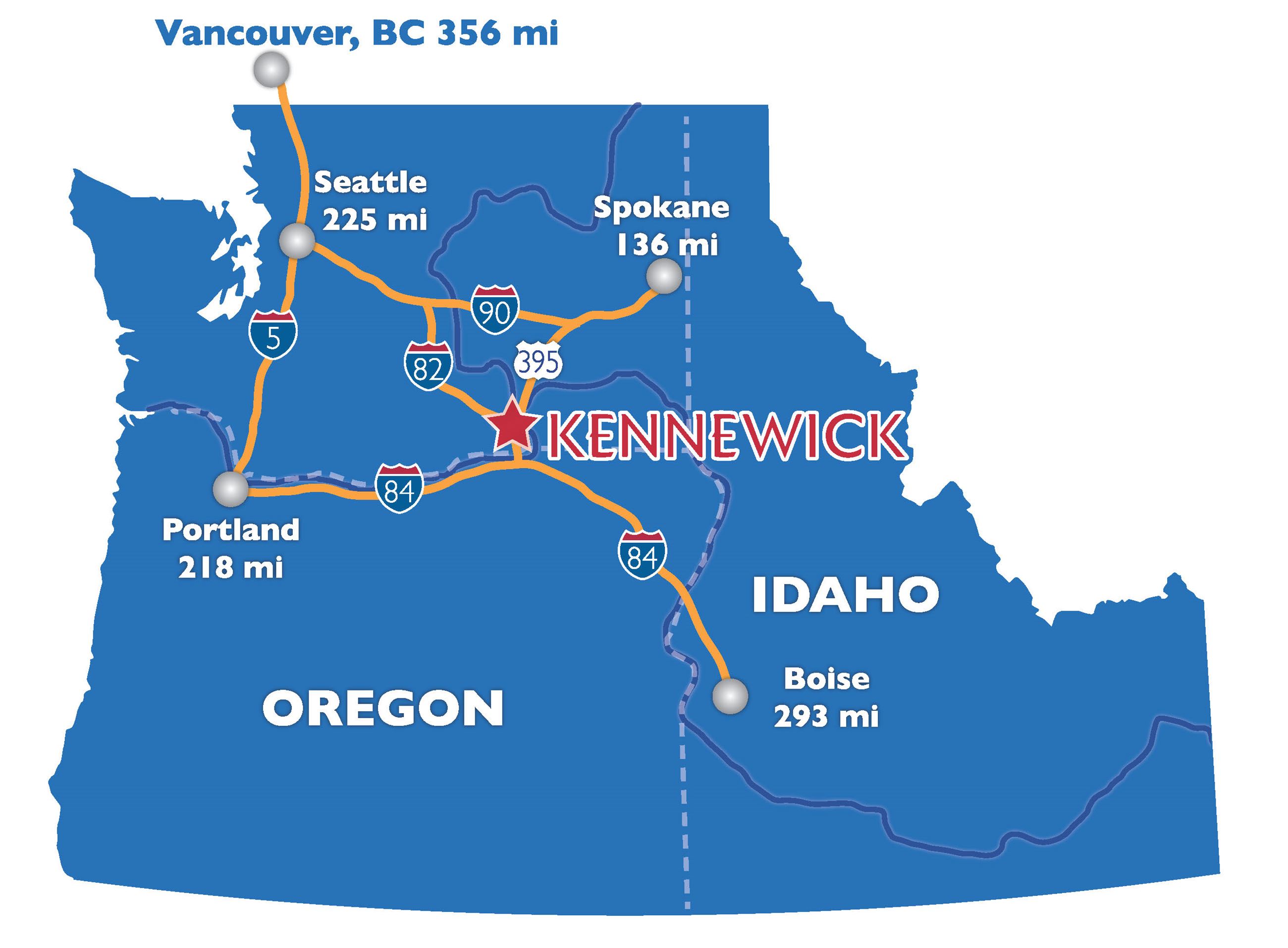 Coming Soon: Tri-Cities Regional — October 26 - November 1, 2026 in Kennewick WA, near the Columbia Center shopping mall.